01: Why it exists
A friend needed a tool, and the one on the market was built for someone else.
A friend of mine has low vision. They can get around their own home, and they can cook, but a medicine label, a date on a carton or a sign in an unfamiliar hallway is a guess. They tried the smart glasses Meta sells. They can describe what you look at, but the answer goes through Meta’s app and Meta’s cloud, it arrives in Meta’s words, and the product is a general assistant first. For someone who mostly wants to know what the label says and whether there is something in the way, that is a lot of ceremony around a small question.
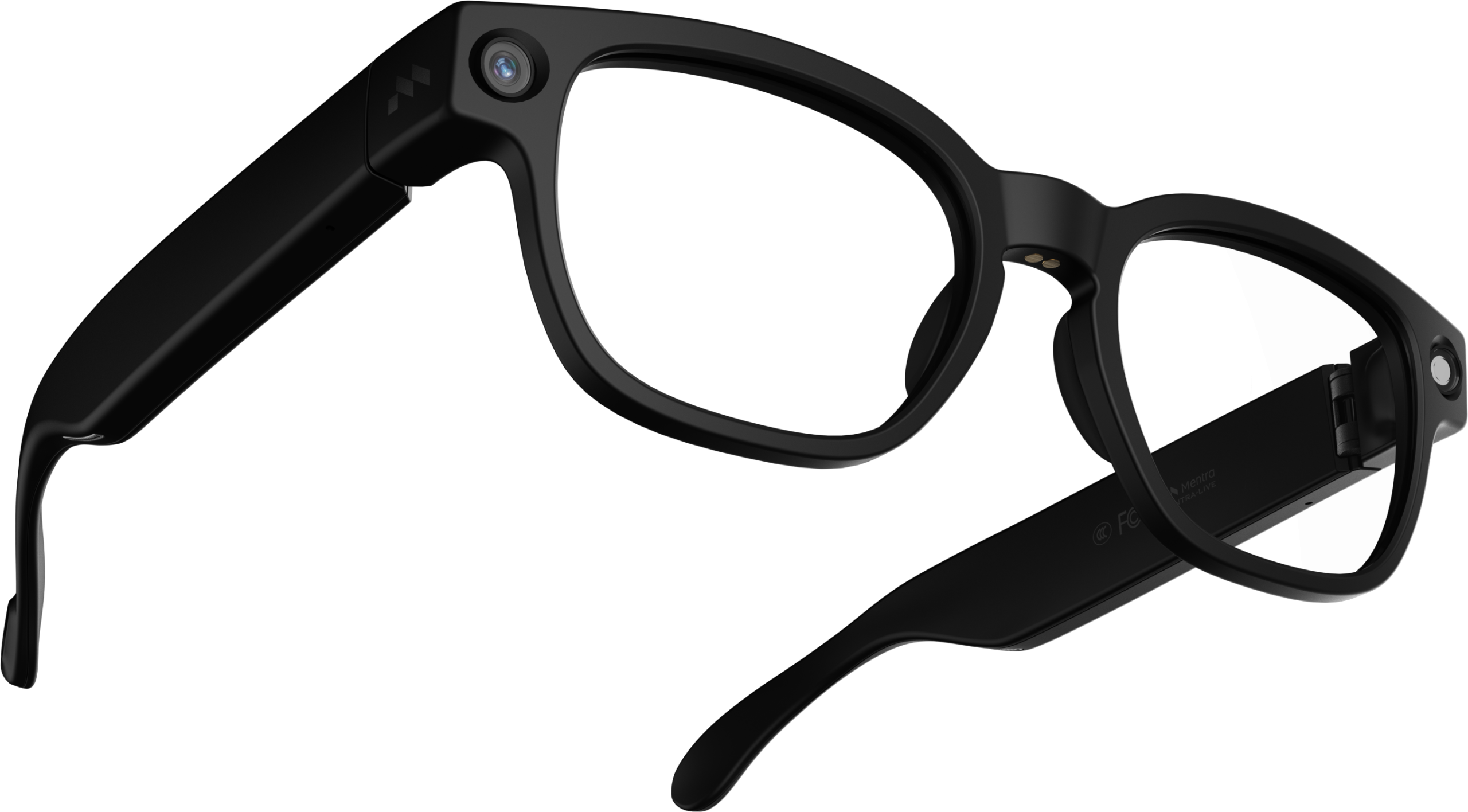
Mentra Live is a different kind of glasses. It has a camera, a microphone and a speaker, and no display. It does not need to be a product on its own. Treated as a camera and a speaker, with an iPhone doing the thinking, it can be whatever the app makes it. So I wrote the app: Sight Assist.
The whole project sits on one sentence. Someone holding an object, standing in a room or walking down a hallway wants a fast, honest, spoken answer to “what is this” and “what is around me”, hands free, without an account and without a cloud they did not choose. Everything below follows from that.
02: Five rules
Five rules the app keeps, and a change that breaks one is a bug.
These came out of watching my friend use the first builds. They are written as rules because that is how they are enforced: a change that breaks one fails review, whatever else it adds.
SPEECH FIRST
The spoken answer comes before anything else the app might do. Saving history, updating the screen, remembering the place, writing diagnostics: none of it may run between “the answer is ready” and “the speaker starts”. The order is checked with os_signpost events in Instruments (audio armed, first audio, first sentence, then the rest), so it is measured rather than assumed. For someone standing in a doorway waiting to hear whether the path is clear, the delay is the product.
ON THE PHONE FIRST
Apple Vision does the reading, the scene, the faces and the places by default. A cloud model (OpenAI, Gemini, Anthropic or a custom endpoint, with the user’s own key) can be switched on to say more, and the app stays useful with no key and no network beyond the Wi-Fi link to the glasses. That is the floor my friend can count on.
PRIVATE BY DEFAULT
Face data, place fingerprints and area memory stay in the app’s own folder on the phone. They leave only if the user turns a cloud provider on for a task. The app recognises only people the user has enrolled. It cannot be used to look up strangers. Privacy here is a matter of data never being sent, which is harder to get wrong than a toggle.
HONEST ABOUT DOUBT
The app never promises a clear path and never names a person with certainty. Distance thresholds are cautious and the phrasing hedges on purpose (“this looks like it might be”). When it finds nothing it says what to try (“move closer, or find more light”) instead of going quiet or making something up. A confident wrong answer is worse than no answer for someone who cannot check it with their eyes, so the quality metric is wrong-name-at-high-confidence, ahead of raw accuracy.
EYES FREE
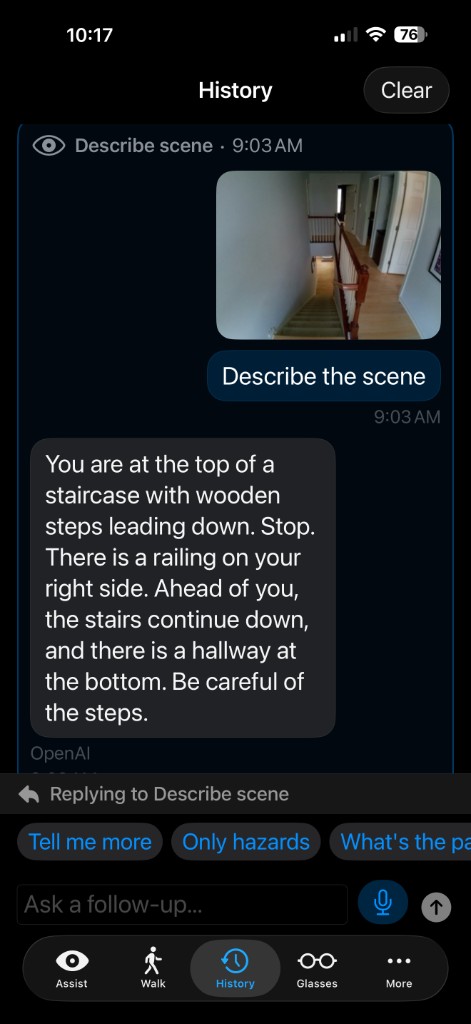
Every result is designed to be heard. Directions are relative to the body (“on your left”, “ahead”, never “left of the photo”), sentences are short enough for speech, and safety comes first in the order. The screens exist for setup and for a sighted helper. They are a convenience, and the voice is the product.
03: How it is built
The glasses carry the camera. The phone does the thinking.
One SwiftUI codebase ships as an iPhone app (iOS 17 and up) and a Mac app (macOS 14 and up), and testers get it through TestFlight. It is around 25,500 lines of Swift in 129 files, with 52 test files behind them. The tests sit where a test can tell the truth: the pure decision code, which runs the same without any hardware attached.
The app talks to the glasses over Bluetooth using the K900 protocol and the LC3 audio codec, both ported from the open MentraOS code. Pictures come from the glasses’ own camera server over Wi-Fi, with a small photo over Bluetooth as the fallback. Nothing custom runs on the glasses. That was the point: no Mentra cloud, no SDK, no app store on the glasses side.
The code is laid out as transport, then policy, then experience, and the policy layer is where the work was. Capture/ decides which source serves which task. Obstacle/ paces the warnings. Reading/ decides when a piece of text is worth reading. Vision/ResponseRules decides what gets said at all. Every capture runs through one state machine, AssistOrchestrator.runAssist: trigger, capture, analyse, speak. A button press and a voice command at the same moment cannot start two captures, and the speaking step comes before history, memory and diagnostics, which run afterwards and never hold it up.
04: The hard problems
Where the tidy answer and the useful answer parted ways.
Each of these was a point where the clean engineering choice and the choice that served my friend were different. Notes on how the second one won.
The hardware is slow, so the app says so
Measuring the glasses’ camera server showed limits no cleverness removes. The latest-photo endpoint lags a capture by 15 to 19 seconds. The gallery listing shows the photo at about 3.7 seconds. Overlapping captures queue up in the firmware, and every photo is written to the gallery whether you want it or not. Rather than hide this behind a fast-looking screen, the app tells the user what is happening (“taking a photo, one moment”) and schedules around the real numbers.
A live stream for walking, and a fallback when it fails
A 3.7 second floor on a still photo makes walk mode miserable. So the app runs its own small RTMP server on the phone (Network.framework and VideoToolbox, no third-party libraries) and asks the glasses to stream 960 by 540 video over the shared Wi-Fi. Apple Vision samples the newest frame about twice a second, and a hazard is spoken within a second or two instead of once per five-second cycle. When the stream drops, the app falls back to snapshots and says that it has.
A software shutter for a camera on a moving head
Reading tasks (a label, a date, a price) need the full-resolution still. Describing tasks can use a stream frame. A head-mounted camera with slow auto-exposure produces motion blur, so stream captures pick the sharpest of the last second of frames by scoring them, and a clearly blurred reading photo triggers one retry before the app admits it could not read it.
Streaming the voice shaves the last half second
Buffered text-to-speech waits for the whole audio file before playing, up to seven seconds in the worst case. The app streams synthesised audio in chunks and starts speaking on the first one. Measured within the same stream, that was about 400 to 530 ms sooner with OpenAI’s voice and 110 to 460 ms sooner with Deepgram’s, with buffered playback kept as the fallback. Cloud answers stream sentence by sentence too, so the first words arrive in about 1.3 seconds.
Reading as you go, without the app babbling
Reading text as it comes into view is easy to prototype and maddening to live with. Pan across a room and it spews fragments. Hold a label still and it reads it forever. Two small, well-tested rules make it livable. A stability gate waits until a block of text has stayed in roughly the same place for several samples and is large and central enough to be deliberate. A dedupe rule remembers what was just read so the same label is not read twice. Both are pure functions, so both are tested without glasses in the room.
Memory for places, the way faces are remembered
After each capture the app works out which area it is in from a fingerprint of the whole image, or starts a new one, then folds in the landmarks, hazards, layout and text it found, weighting what it sees often and recently. Over repeated visits an area builds up a stable summary the user can name and ask about. Memory is capped at 50 areas, oldest out first, so it cannot grow without limit on a phone.
05: Honesty in the code
Honesty is enforced by code, because a prompt is only a request.
The whole value of this app is a spoken answer my friend can trust without being able to check it. So honesty cannot be something I ask the model for. It has to be built in. Three places it lives.
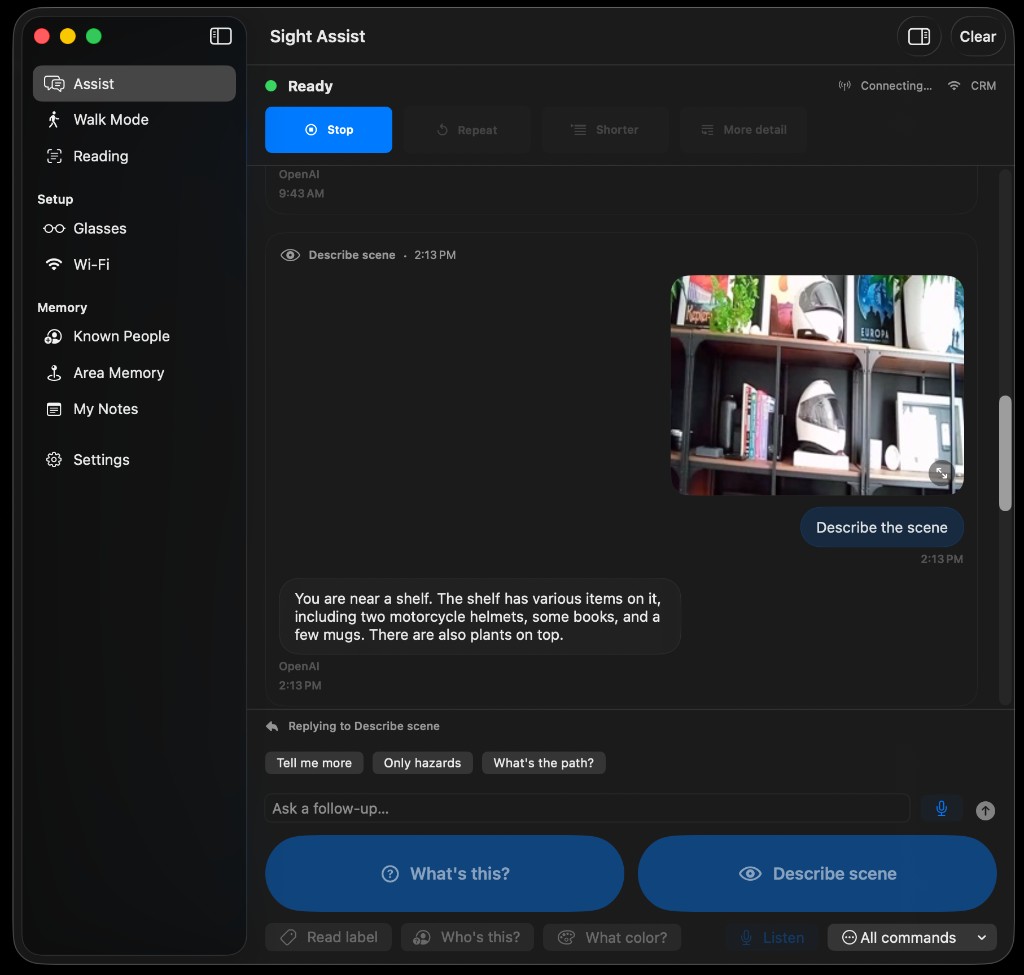
What gets said is governed by one file, Vision/ResponseRules.swift: no pleasantries, no commentary about the task, no filler openers, concrete over vague, doubt kept in, and a budget on length. The rules go into every cloud prompt, and a deterministic sanitiser checks the output again before it is spoken, because a model does not always do what it is told.
The order of a scene description is fixed: immediate hazards first, prefixed with “stop”, then where you are and how the room is laid out, then nearer hazards, then landmarks, and uncertainty last. It is a pure function with tests that assert the order.
The docs are held to the same standard. The backlog once recorded that two advertised features, “who is this” and area memory, were fully built and never wired to anything, and that the intent document therefore overstated what worked. Both are wired now. The practice stayed: a feature the docs claim and the code does not run is treated as a bug.
06: How I worked
Several agents in parallel, one branch that counts.
Features and fixes went to background coding agents working in parallel, each in its own git worktree on its own branch, off one integration branch. Each agent owned a set of files (the obstacle code and the camera client, say, or the speech code, or the vision prompts, or Known People), so they did not collide.
Verification is a script, and it is not optional: it runs the full test suite, around 335 tests, plus a plain iOS simulator build. The Xcode project is generated from project.yml, so a merge conflict in the project file is resolved by taking either side and regenerating. That removed a whole category of pointless conflicts.
One rule was learned the hard way. After an agent committed work nobody asked for and configured code signing on its own, agents may no longer commit to the base branch or touch credentials without a confirmation for that specific action. The parallelism is what made a solo build this size possible. The rule is what keeps it trustworthy.
07: Where it stands
What my friend has in their pocket, and what is still unproven.
TestFlight build 9 is the current iOS build. It covers the voice and tap commands, a chat-style history a sighted helper can scroll, full-resolution capture over Wi-Fi, walk mode on the live stream with snapshots as the fallback, reading mode, Known People, area memory, the glasses’ status light, a walk mode that keeps running from the lock screen while they are moving, and audio routed correctly to the glasses.
A release is one command. The script generates the secrets, bumps the build number, archives, exports and uploads through the App Store Connect API.
The gap is honest and still open. The simulator cannot exercise Bluetooth, Wi-Fi capture or the glasses’ audio, so the whole feature stack has only been proven end to end on the physical device, in their hands and mine. The docs say so, rather than claiming coverage the tests cannot give.
08: What it taught me
Build for one person you can watch, and the rest follows.
The glasses did not shape this project. One person did. Watching my friend wait in a doorway for the answer, or hear a label read twice, told me more than any spec, and every rule above came from a moment like that. A few of the stances that carried the work, in case they are useful to someone else.
Start from the sentence, then look at the hardware
“The shortest honest path from a trigger to useful speech” produced the architecture. The glasses only constrained it.
Put the values in the code
Privacy holds because the data is never sent. Speech-first holds because the order is measured. Honesty holds because a sanitiser runs. A value in a prompt is a hope.
Measure, then decide
The hardware delays were probed directly and pinned in code comments. The voice-streaming gains were measured within one stream, because numbers across calls lie.
Test where a test can tell the truth
The decision code carries the tests. The hardware seam is checked on the device and marked as the open gap.
Fail out loud
Blur, a dropped stream, low battery, an unreachable camera, no match: each has a designed, spoken, truthful response. For a user who cannot see the screen, a silent failure is the worst one.
What my friend notices
None of this discipline is visible to the person wearing the glasses. What they notice is that the app speaks quickly, says when it is unsure, keeps their data on their phone, and reads the label they are holding. That is the whole product.